
| Time | Status | User Agent | |
|---|---|---|---|
Retrieving recent requests… | |||
The Call Operations API enables applications to perform real-time operations on an active Smartflo call. It allows supervisors, administrators, and integrated business applications to manage live conversations programmatically without requiring manual intervention from the Smartflo Portal.
Using this API, you can perform the following operations on an ongoing call:
- Monitor – Listen to an active conversation silently without either participant being notified.
- Whisper – Privately communicate with the agent while the customer continues to hear only the agent.
- Barge – Join the active conversation and communicate with both the customer and the agent.
- Transfer – Transfer an active call to another Smartflo Agent, Softphone/Extension, Department, Inbound Queue, IVR, SIP Trunk, or an external mobile number.
The API identifies the active conversation using either the Call ID (call_id) or the Reference ID (ref_id) generated by Smartflo during call initiation. Based on the requested operation and destination, Smartflo validates the request and performs the requested action.
Key Features
- Perform real-time call control on active calls.
- Support supervisor monitoring and coaching.
- Transfer calls across multiple Smartflo destinations.
- Support both Call ID (
call_id) and Reference ID (ref_id) for identifying the active call. - Integrate with Webhooks for complete call lifecycle tracking.
Important
- This API works only for active (live) calls.
- Either
call_idorref_idmust be provided to identify the active call.- Once the call has ended, no further operations can be performed.
Typical Flow
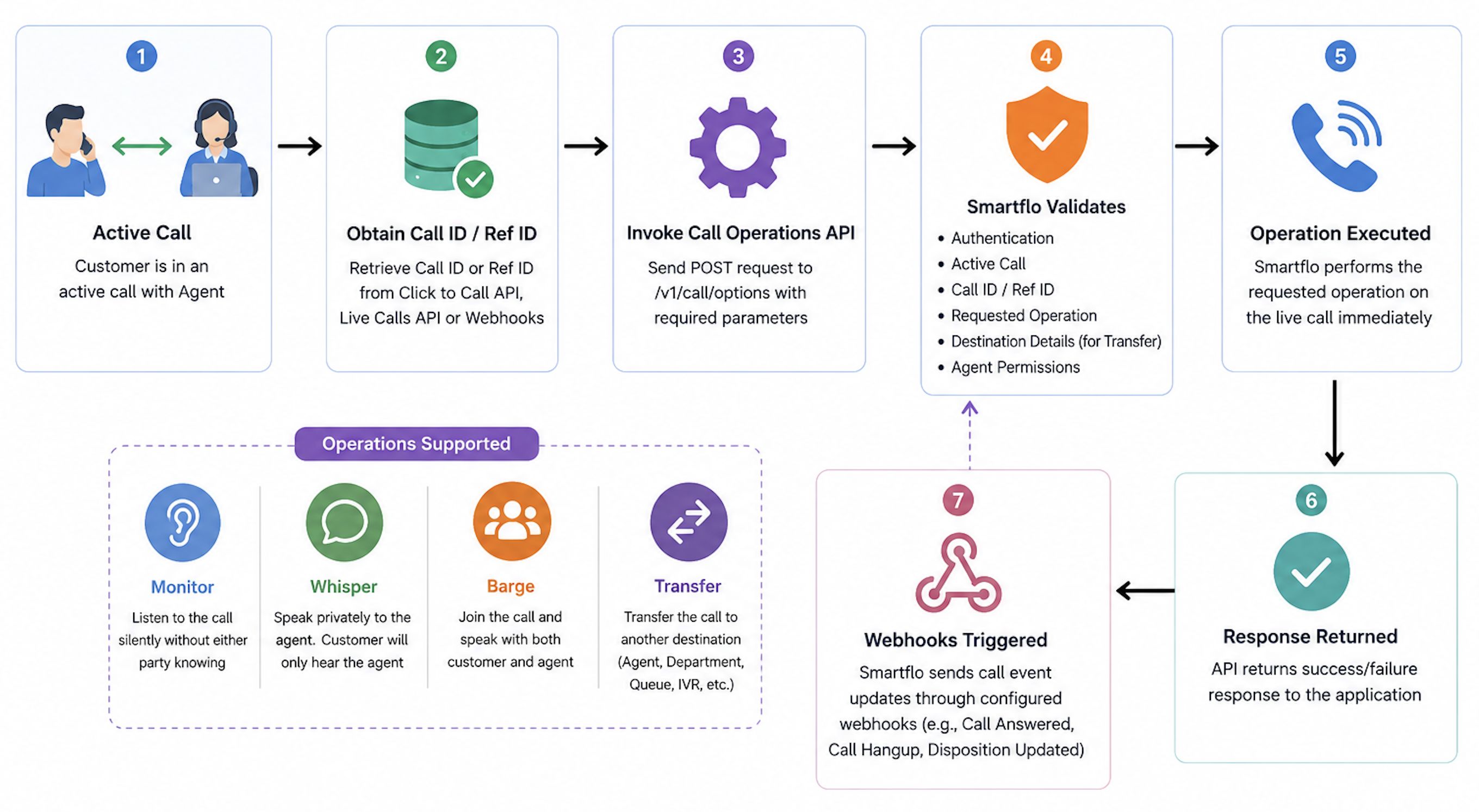
The diagram below illustrates the high-level workflow of the Call Operations API. It shows how an application identifies an active call using either the Call ID (call_id) or Reference ID (ref_id), invokes the Call Operations API, and how Smartflo validates and executes the requested operation on the live call.
📘 Notes!
- Call Operations can only be performed on an active (live) call.
- Either
call_idorref_idcan be used to identify the active call.- Depending on the requested operation, Smartflo validates the destination and executes the action immediately.
- If both
call_idandref_idare provided, Smartflo can use the provided identifiers to identify the active call.
How it Works
The Call Operations API enables applications to control an active Smartflo call programmatically by performing actions such as Monitor, Whisper, Barge, or Transfer.
The application first identifies the active call using either the Call ID (call_id) or Reference ID (ref_id) and then sends a request to the API with the desired operation and the required parameters.
Smartflo validates the request, verifies that the call is still active, validates any operation-specific parameters or destination details, and executes the requested operation in real time.
The diagram below provides a high-level overview of the Call Operations workflow:
📘 Notes!
ref_idis mandatory in every API request.- Transfer supports both
agent_idandintercom, depending on the selected destination.
Request Headers
The following request headers are required to successfully invoke the Call Operation API.
| Header | Type | Required | Description |
|---|---|---|---|
| Authorization | String | Yes | Access token used to authenticate the API request. |
| Content-Type | String | Yes | Specifies the format of the request body. Use application/json. |
| Accept | String | No | Specifies the expected response format. application/json is recommended. |
Request Parameters
Use the following parameters to specify the call operation and identify the active call. Depending on the selected operation, additional parameters such as agent_id or intercom may be required.
| Parameter | Type | Description |
|---|---|---|
| type | Integer | Specifies the call operation to perform. 1 = Monitor, 2 = Whisper, 3 = Barge, 4 = Transfer. |
| call_id | String | Unique identifier of the active call. Either call_id or ref_id must be provided to identify the active call. |
| ref_id | String | Reference ID returned when the call was initiated. Can be used as an alternative to call_id to identify the active call. |
| agent_id | String | Required for Monitor, Whisper, and Barge operations. Also supported for Transfer when transferring directly to a Smartflo Agent. |
| intercom | String | Required for Transfer when transferring to an External Mobile Number, Softphone/Extension, Department, Inbound Queue, IVR, or SIP Trunk. |
Note: At least one of
call_idorref_idmust be provided in the request to identify the active call.
Sample Response (Success)
When the request is successfully validated and accepted, the API returns a success response indicating that the requested call operation has been initiated.
{
    "success": true,
    "message": "Transfer succeeded"
}
Error Response Example
The following example shows the response returned when the API request cannot be processed due to invalid input, authentication issues, or other request validation errors.
{
  "success": false,
  "message": "Invalid Ref ID."
}
Response Parameters
The following table describes the parameters returned in a successful API response.
| Parameter | Type | Description |
|---|---|---|
| success | Boolean | Indicates whether the API request was successfully validated and accepted for processing. A value of true indicates the request was processed successfully, while false indicates that the request failed validation or could not be executed. |
| message | String | A human-readable message describing the result of the API request. This typically confirms that the requested call operation has been accepted or provides information about any validation failure. |
Supported Operation Destinations
The Call Operations API supports different destination types depending on the operation being performed. Monitor, Whisper, and Barge are agent-based operations and always require the agent_id parameter. Transfer supports both agent_id and intercom, depending on the selected destination.
The table below summarizes the supported destinations and the request parameter required for each operation.
| Destination | Monitor | Whisper | Barge | Transfer | Request Parameter | Description |
|---|---|---|---|---|---|---|
| Smartflo Agent (Added on Platform) | ✅ | ✅ | ✅ | ✅ | agent_id | Perform Monitor, Whisper, Barge, or Transfer operations on a Smartflo Agent using the Agent ID configured on the platform. |
| External Mobile Number | ❌ | ❌ | ❌ | ✅ | intercom | Transfer the active call to a valid external mobile or landline number. This is ideal for remote agents, field executives, or on-call support teams. |
| Softphone / Extension | ❌ | ❌ | ❌ | ✅ | intercom | Transfer the active call to another Smartflo Softphone or Extension using the configured extension number. |
| Department | ❌ | ❌ | ❌ | ✅ | intercom | Transfer the active call to a Department using the Department Intercom ID. Smartflo automatically routes the call to an available agent based on the configured routing strategy. |
| Inbound Queue | ❌ | ❌ | ❌ | ✅ | intercom | Transfer the active call to an Inbound Queue using the Queue ID. Smartflo places the caller into the queue and distributes the call according to the configured queue settings. |
| IVR | ❌ | ❌ | ❌ | ✅ | intercom | Transfer the active call to another IVR using the IVR ID, allowing the caller to navigate a different IVR menu or self-service flow. |
| SIP Trunk | ❌ | ❌ | ❌ | ✅ | intercom | Transfer the active call to an external PBX or third-party telephony platform using the configured SIP Trunk ID. |
📘 Notes!
- Monitor, Whisper, and Barge are supported only with the
agent_idparameter.- Transfer supports both
agent_idandintercom:
- Use
agent_idto transfer the call directly to another Smartflo Agent.- Use
intercomto transfer the call to an External Mobile Number, Softphone/Extension, Department, Inbound Queue, IVR, or SIP Trunk.
Operation Use Cases
The following examples demonstrate how to perform different Transfer and Barge operations using the Call Operations API. In each example, replace the sample values with your own Call ID/Ref ID and destination identifier.
1. Transfer to an External Mobile Number
Use this operation to transfer an active call to a valid external mobile or landline number. This is commonly used for remote agents, field executives, or on-call support personnel.
{
  "type": "4",
  "ref_id": "175XXXX218.8118",
  "intercom": "9196XXX9832"
}
2. Transfer to a Softphone / Extension
Transfer the active call to another Smartflo Softphone or Extension by providing the configured extension number.
{
  "type": "4",
  "ref_id": "1758782566.8131",
  "intercom": "0602XXX70085"
}
3. Transfer to a Smartflo Agent
Transfer the ongoing call directly to a Smartflo Agent configured on the platform by specifying the Agent ID. The Agent ID can be obtained from the Smartflo Portal.
{
  "type": "4",
  "ref_id": "175XXXX218.8118",
  "intercom": "05080XX4"
}
4. Transfer to a Department
Transfer the active call to a Department by specifying the Department "Transfer Code". Smartflo automatically routes the call to an available agent based on the configured department routing strategy.
{
  "type": "4",
  "ref_id": "175XXXX218.8118",
  "intercom": "80XX4"
}
5. Transfer to an Inbound Queue
Transfer the active call to an Inbound Queue by specifying the Queue "Transfer Code". Smartflo places the caller into the queue and routes the call according to the configured queue strategy.
{
  "type": "4",
  "ref_id": "175XXXX218.8118",
  "intercom": "70XX4"
}
6. Transfer to an IVR
Transfer the active call to another IVR by specifying the IVR "Transfer Code" in the intercom parameter. This allows the caller to continue to a different IVR menu or self-service flow.
{
  "type": "4",
  "ref_id": "175XXXX218.8118",
  "intercom": "90XX4"
}
7. Transfer to a SIP Trunk
Transfer the active call to an external PBX or third-party telephony platform by specifying the configured SIP Trunk "Transfer Code".
{
  "type": "4",
  "ref_id": "175XXXX218.8118",
  "intercom": "60XX4"
}
Common Error Messages
The following table lists common error messages returned by the Call Operations API, along with their possible causes and recommended resolutions.
| Error Message | Possible Cause | Resolution |
|---|---|---|
| Invalid Ref ID. | The provided ref_id is incorrect, does not exist, or does not correspond to an active call. | Verify the ref_id received when the call was initiated and ensure that it belongs to the active call. |
| Transfer invalid | The transfer request contains an invalid or unsupported transfer destination, or the destination details are incorrect. | Verify the intercom or agent_id value and ensure that the selected transfer destination is valid and configured on Smartflo. |
| Only one identifier is allowed. Provide either 'call_id' or 'ref_id' but not both. | Both call_id and ref_id have been provided in the same request. | Provide either call_id or ref_id, but do not include both in the same request. |
| Invalid Call ID. | The provided call_id is incorrect, does not exist, or is not associated with an active call. | Verify the call_id using the Live Calls API or the call initiation response and retry the request with a valid identifier. |
| The selected type is invalid. | The value provided in the type parameter is not a supported Call Operation type. | Use a valid type value: 1 = Monitor, 2 = Whisper, 3 = Barge, 4 = Transfer. |
Call Status & Webhooks
The Call Operations API performs actions on an active call and returns an immediate acknowledgement indicating whether the request has been accepted. To track the progress and final outcome of the call after the operation is performed, configure Smartflo Webhooks.
The following webhook events are recommended for monitoring the complete call lifecycle:
| Webhook Event | Description |
|---|---|
| Call Received On Server | Triggered when an inbound call is received by the Smartflo platform. |
| Call Answered by Agent | Triggered when the call is successfully answered by an agent. |
| Call Hangup (Answered) | Triggered when an answered call is disconnected after the requested operation is completed. |
| Call Hangup (Missed) | Triggered when the call is not answered and is subsequently disconnected. |
| Disposition Status Updated | Triggered when the final disposition or outcome of the call is updated. |
Note: Configuring Webhooks is recommended to receive real-time updates on call progress and final call status after performing Monitor, Whisper, Barge, or Transfer operations.