
| Time | Status | User Agent | |
|---|---|---|---|
Retrieving recent requests… | |||
The Click-to-Call Support API enables external applications such as CRMs, business applications, or custom systems to initiate calls through Smartflo without requiring users to log in to the Smartflo portal.
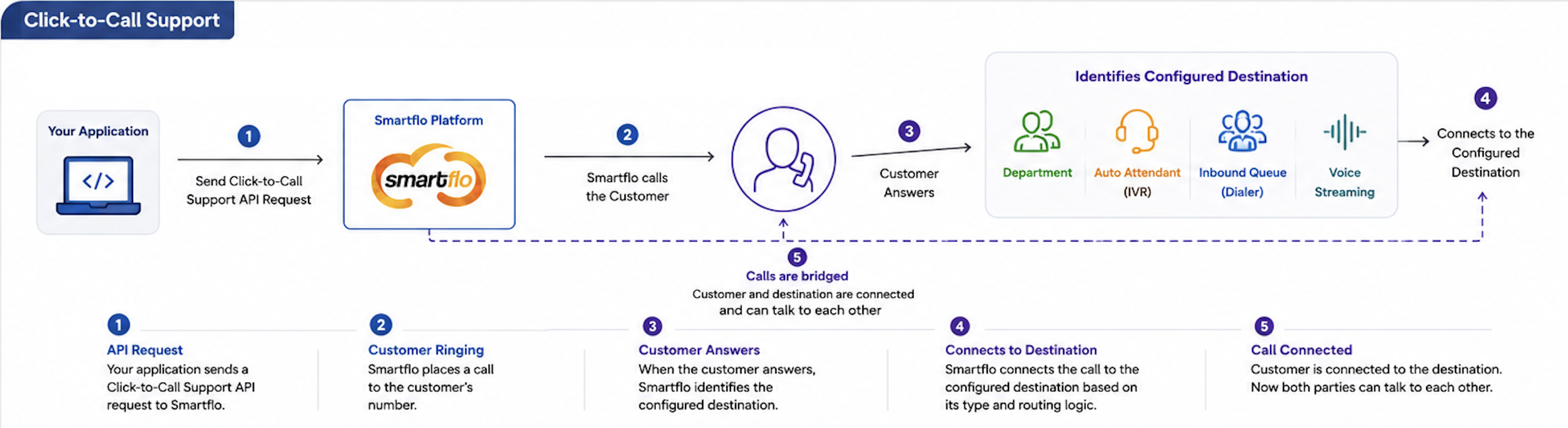
Unlike the regular Click-to-Call API, the Click-to-Call Support API follows a customer-first calling approach. Smartflo first initiates a call to the customer. Once the customer answers, Smartflo initiates the second leg of the call to the destination configured with the Click-to-Call Support API Key.
This approach ensures that the configured destination is contacted only after the customer has answered the call. The API operates asynchronously. It immediately acknowledges that the request has been accepted for processing instead of waiting for the call to be answered or completed.
To track the actual call progress and final outcome, configure Smartflo Webhooks.
ImportantThe Click-to-Call Support API (
/v1/click_to_call_support) is being enhanced as part of Smartflo's security improvements.Currently, the
Authorizationheader is optional. Effective 30 September 2026, theAuthorizationheader will be mandatory, and requests without a valid Authorization Token will be rejected.Action Required: If you are using the Click-to-Call Support API, please update your integration to include a valid Authorization Token in the request header before 30 September 2026.
Note: The existing
api_keyparameter in the request body will continue to be supported as per the API specification. TheAuthorizationheader is being introduced as an additional mandatory authentication mechanism.
Typical Flow
The Click-to-Call Support API follows the below sequence:
- Your application sends a Click-to-Call Support request to Smartflo.
- Smartflo validates the Bearer Token, API Key, and request parameters.
- Smartflo accepts the request and immediately returns the request acceptance response.
- Smartflo initiates the first leg of the call to the customer.
- Once the customer answers, Smartflo initiates the second leg of the call to the configured destination.
- Smartflo bridges the customer and destination.
- Call progress and final call status are communicated to your application through Webhooks.
Example
Your Application → Smartflo → Customer → Destination
Note: A successful API response only confirms that the request has been accepted for processing. It does not indicate that the customer or destination has answered or that the call has been connected.
How it Works
The Click-to-Call Support API requires both a Token and a Click-to-Call Support API Key. The diagram below provides a high-level overview of the Click-to-Call support workflow, including call initiation, agent connection, customer dialing, and call bridging.
For detailed information about generating and managing the API Key, refer to:
Click-to-Call Support API - Getting Started
Important: The Bearer Token is passed in the
Authorizationheader, while the Click-to-Call Support API Key is passed as theapi_keyrequest parameter.
Request Headers
The following headers are required to invoke the Click-to-Call Support API.
| Header | Required | Description |
|---|---|---|
| Authorization | Yes | Bearer Token used to authenticate the API request. |
| Content-Type | Yes | Specifies that the request body is sent in JSON format. |
Request Parameters
Provide the following parameters in the request body to initiate a Click-to-Call Support request.
Note: Parameters marked with
*are mandatory.
| Parameter | Type | Required | Description |
|---|---|---|---|
| customer_number* | String | Yes | Customer's phone number that will receive the first leg of the call. The number must be provided in a valid format supported by Smartflo. |
| api_key* | String | Yes | Unique Click-to-Call Support API Key generated from the Smartflo portal. The API Key is associated with the configured DID and destination. |
| async* | Integer | Yes | Specifies whether the request should be processed asynchronously. Currently, only the value 1 is supported. |
| customer_ring_timeout | Integer | No | Maximum time, in seconds, for which the customer's number will ring. Minimum value is 10 seconds and maximum value is 30 seconds. Defaults to 30 seconds if not specified. |
| caller_id | String | No | Caller ID displayed to the customer. If provided, it must be a valid DID assigned to the Smartflo account. |
| call_timeout | Integer | No | Maximum duration of the connected call in seconds. Once the specified duration is reached, Smartflo automatically disconnects the call. |
| custom_identifier | Object | No | Supports up to 10 custom identifiers in a single request. The combined size of all custom identifier data, including keys, values, colons (:), commas, double quotes ("), braces ({}), and other JSON characters, must not exceed 512 characters. Custom identifier values should be alphanumeric, and the $ character is not supported in parameter values. These custom identifiers are returned unchanged in the webhook payload, allowing you to correlate webhook events with your application. |
Sample Request
The following example demonstrates how to initiate a Click-to-Call Support request.
curl --request POST \
  --url https://api-smartflo.tatateleservices.com/v1/click_to_call_support \
  --header "Content-Type: application/json" \
  --header "Authorization: Bearer <YOUR_API_TOKEN>" \
  --data '{
    "customer_number": "999XXX8887",
    "api_key": "<YOUR_API_KEY>",
    "caller_id": "9180694XXXXX",
    "async": 1,
    "customer_ring_timeout": 30,
    "call_timeout": 300,
    "custom_identifier": {
      "customer_id": "CUST1XX45",
      "ticket_id": "TKT9XX65"
    }
  }'
Sample Response (Success)
The following example shows the response returned when the Click-to-Call Support request is successfully accepted for processing.
{
    "success": true,
    "message": "Originate successfully queued",
    "ref_id": "504XX41c-c2Xe-4eX4-9X9e-bXX0f10dXXc2"
}
Note: The successful response confirms only that Smartflo has accepted the request for processing. It does not indicate that the call has been answered or connected.
Response Parameters
The API returns the following parameters indicating whether the request has been accepted for processing.
| Parameter | Type | Description |
|---|---|---|
| success | Boolean | Indicates whether the API request has been accepted successfully. |
| message | String | Response message corresponding to the request status. |
| ref_id | String | Unique Smartflo reference ID generated for the Click-to-Call Support request. It can be used to correlate the request with Webhook events and supported call operations. |
The ref_id is a unique reference generated for the Click-to-Call Support request. Store this value in your application because it can be used to correlate the initial API request with subsequent Webhook events and supported call operations.
Call Status & Webhooks
The Click-to-Call Support API returns only the request acceptance status. Actual call progress, including call initiation, ringing, answered, completed, failed, and other call events, is communicated through Smartflo Webhooks.
For detailed information about supported Webhook events, payload structure, and configuration, refer to the Smartflo Webhook Documentation.
Response Codes
The following response codes help you identify whether the request was processed successfully or if corrective action is required due to an error.
| HTTP Code | Description |
|---|---|
| 200 | Request accepted successfully. |
| 400 | Invalid request parameters or validation failed. |
Note: The exact error message returned in the response provides additional information about the cause of the failure.
Error Response Example
The following example shows the response returned when the API request cannot be processed due to invalid input, authentication issues, or other request validation errors.
{
    "success": false,
    "message": "Invalid details provided."
}{
"customer_number": [
"The customer number must be between 10 and 12 digits."
]
}Common Error Messages
The following table lists common errors, their possible causes, and recommended resolutions.
| Error Message | Possible Cause | Resolution |
|---|---|---|
| Invalid details provided | One or more request parameters are missing, contain invalid values, or are of an incorrect data type. | Verify all required parameters and ensure that each parameter contains a valid value and the correct data type. |
| Provide a valid caller_id. | The caller_id provided in the request is invalid, incorrectly formatted, or not configured for the account. | Verify that the caller_id is valid, correctly formatted, and configured in the Smartflo account. |
| The customer number must be between 10 and 12 digits. | The customer/destination number does not meet the supported digit-length requirement. | Ensure that the customer number contains between 10 and 12 digits and is correctly formatted. For international numbers, ensure that international calling is enabled for both the account and the respective user. |
| Originate failed | The call could not be initiated due to a temporary platform issue or an invalid request configuration. | Ensure that the request includes async = 1, as it is mandatory for all Smartflo Calling APIs. If the issue persists after verifying the request, wait a few minutes and retry. If the problem continues, contact Smartflo Support with the request details and timestamp for further investigation. |
📘 Notes!
The API is asynchronous and immediately acknowledges the request after successful validation.
Pass
asyncas1. Synchronous mode is not supported.Store the returned
ref_idto correlate the API request with subsequent Webhook events and future call operations.You can include up to 10 custom identifiers per request. The combined JSON representation of all custom identifiers must not exceed 512 characters.
Custom identifier values must be alphanumeric. The
$character is not supported.Configure Webhooks to receive real-time updates on the complete call lifecycle.
Related APIs
The following APIs can be used along with the Click-to-Call Support API to manage active calls, retrieve call information, and receive real-time events.
| API | Purpose |
|---|---|
| Call Operations API | Perform operations such as Hangup, Transfer, Conference, Monitor, Whisper, and Barge on an active call. |
| Fetch Active Calls API | Retrieve details of currently active calls. |
| Call Detail Records (CDR) API | Fetch historical call logs and recordings. |
| Webhook API | Receive real-time call event notifications. |