
| Time | Status | User Agent | |
|---|---|---|---|
Retrieving recent requests… | |||
The Click-to-Call API enables your application to initiate an outbound call between a Smartflo agent and a customer with a single API request. Instead of manually dialing numbers, your application simply sends the required call details to Smartflo, and the platform automatically establishes the call.
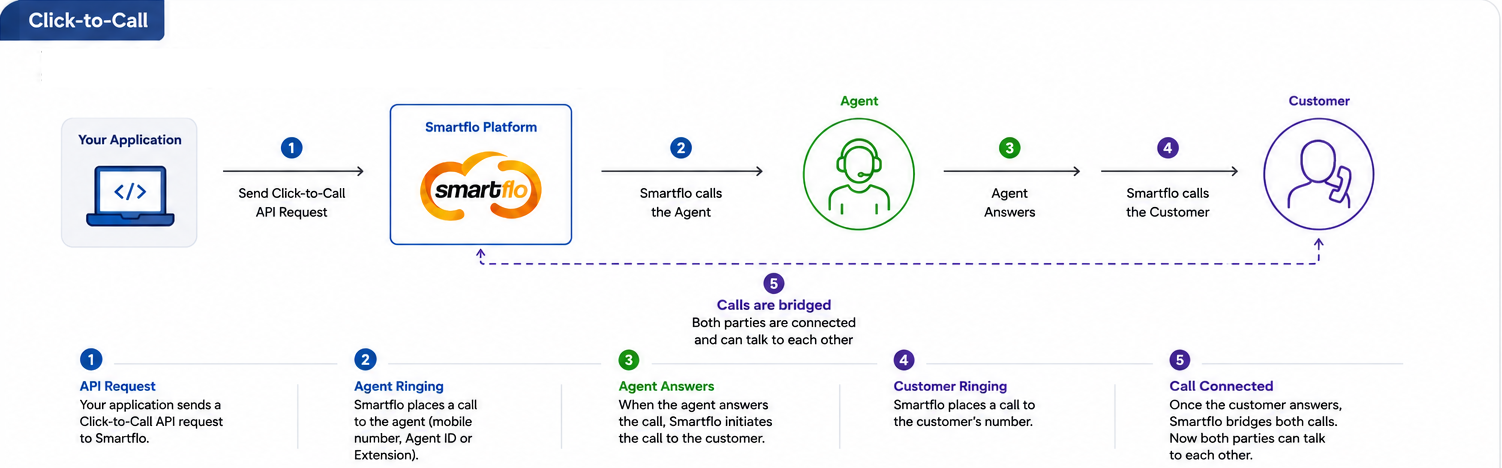
When a request is received, Smartflo first places a call to the specified agent (using the registered mobile number, Smartflo Agent ID, or Smartflo Extension for Softphone users). Once the agent answers, Smartflo initiates the second leg of the call to the destination number. After the customer answers, Smartflo seamlessly bridges both call legs, allowing the agent and customer to communicate.
This API is ideal for CRM integrations, lead management systems, customer support platforms, sales automation, and any application that requires one-click outbound calling without manual intervention.
The Click-to-Call API operates asynchronously, meaning it immediately acknowledges that the request has been accepted for processing instead of waiting for the call to complete. To monitor the call lifecycle—including ringing, answered, completed, missed, or failed events—configure Smartflo Webhooks, which provide real-time event notifications to your application.
Typical Flow
- Your application sends a Click-to-Call request to Smartflo.
- Smartflo calls the specified agent.
- After the agent answers, Smartflo calls the destination number.
- Once the customer answers, Smartflo bridges both call legs.
- Call progress and final status are delivered to your application through Webhooks.
Note: A successful API response only confirms that the request has been accepted for processing. It does not indicate that the call has been connected or answered. Use Smartflo Webhooks to track the complete call lifecycle and receive real-time call status updates.
How it Works
The diagram below provides a high-level overview of the Click-to-Call workflow, including call initiation, agent connection, customer dialing, and call bridging.
Request Headers
The following request headers are required to successfully invoke the Click-to-Call API.
| Header | Type | Required | Description |
|---|---|---|---|
Authorization | String | Yes | Access token used to authenticate the API request. |
Content-Type | String | Yes | Specifies the format of the request body. Use application/json. |
Accept | String | No | Specifies the expected response format. application/json is recommended. |
Request Parameters
Provide the following parameters in the request body to initiate a Click-to-Call request between a Smartflo agent and the destination number.
| Parameter | Type | Required | Description |
|---|---|---|---|
| agent_number | String | Yes | Identifier of the Smartflo agent who will receive the first leg of the call. You can pass any one of the following: • Registered Agent Mobile Number • Smartflo Agent ID (050XXXXXX) • Smartflo Agent Extension (060XXXXXX) for agents using Smartflo Softphone. |
| destination_number | String | Yes | Mobile or landline number of the customer to be called. The number should be provided in a valid format supported by Smartflo. |
| caller_id | String | No | Caller ID displayed to the destination party. If provided, it must be a Caller ID assigned to your Smartflo account. If omitted, the account's default Pilot Number is used. |
| async | Integer | Yes | Specifies whether the request should be processed asynchronously. Currently, only the value 1 is supported. The API always processes Click-to-Call requests asynchronously and immediately returns the request acceptance status. |
| call_timeout | Integer | No | Maximum duration of the connected call in seconds. Once the specified timeout is reached, Smartflo automatically disconnects the call. |
| custom_identifier | Object | No | Supports up to 10 custom identifiers in a single request. The combined size of all custom identifier data (including keys, values, colons (:), commas, double quotes ("), braces ({}), and other JSON characters) must not exceed 512 characters. Custom identifier values should be alphanumeric, and the $ (dollar) character is not supported in parameter values. These custom identifiers are returned unchanged in the webhook payload, allowing you to correlate webhook events with your application. |
Sample Request
The following example demonstrates how to initiate a Click-to-Call request using the Smartflo Click-to-Call API.
curl --request POST \
  --url https://api-smartflo.tatateleservices.com/v1/click_to_call \
  --header "Content-Type: application/json" \
  --header "Authorization: Bearer <YOUR_API_TOKEN>" \
  --data '{
    "agent_number": "050xxx3456",
    "destination_number": "98xxx43210",
    "caller_id": "08xxx678900",
    "async": 1,
    "call_timeout": 300
  }
Sample Response (Success)
The following example shows the response returned when the Click-to-Call request is successfully accepted for processing.
{
    "success": true,
    "message": "Call originated successfully.",
    "ref_id": "C2C2408011234xxx89"
}
Response Parameters
The API returns the following parameters indicating whether the request has been accepted for processing. Since the API is asynchronous, the response confirms only the request acceptance. Use Smartflo Webhooks to track the complete call lifecycle and receive real-time call status updates.
| Parameter | Type | Description |
|---|---|---|
| success | Boolean | Indicates whether the API request has been accepted successfully. |
| message | String | Response message corresponding to the request status. |
| ref_id | String | Unique Smartflo reference ID generated for the Click-to-Call request. This identifier can be used to correlate webhook events and perform supported call operations. |
Call Status & Webhooks
The Click-to-Call API returns only the request acceptance status. Actual call progress, including call initiation, ringing, answered, completed, failed, and other call events, is communicated through Smartflo Webhooks.
For detailed information about supported webhook events, payload structure, and configuration, please refer to the Webhook Documentation.
Response Codes
The following response codes help you identify whether the request was processed successfully or if corrective action is required due to an error.
| HTTP Code | Description |
|---|---|
| 200 | Request accepted successfully. |
| 400 | Invalid request parameters or validation failed. |
Error Response Example
The following example shows the response returned when the API request cannot be processed due to invalid input, authentication issues, or other request validation errors.
{
    "success": false,
    "message": "Invalid destination number."
}
Common Error Messages
The table below lists common error messages returned by the Click-to-Call API, along with their possible causes and recommended resolutions to help you troubleshoot integration issues efficiently.
These descriptions are concise and consistent with the rest of your API documentation.
| Error Message | Possible Cause | Resolution |
|---|---|---|
| Agent is Blocked | The selected agent is currently in a blocked state and cannot initiate or receive calls. | Unblock the agent from the Smartflo Dashboard and retry the API request. |
| Invalid request body | One or more request parameters are missing, contain invalid values, or are of an incorrect data type. | Review the API request payload and ensure all mandatory fields are provided with the correct data types and formats as defined in the API documentation. |
| DID Selected is either disabled or Outbound calling is disabled. | The specified Caller ID (DID) is invalid, disabled, not associated with your account, or outbound calling is not enabled for it. | Use a valid Caller ID (DID) that is active, configured for your account, and enabled for outbound calling. |
| Call missed by agent | The agent did not answer the call, or the agent's mobile number was unreachable, switched off, or out of network coverage. | Verify that the agent's mobile number is active, reachable, and has network connectivity. Once the agent is available, retry the API request. |
| Endpoint request timed out | The system attempted to connect the first leg of the call but did not receive a response within 30 seconds. This typically occurs when using synchronous API execution. | async = 1 is mandatory for all Smartflo Calling APIs. Ensure the request includes async = 1 to enable asynchronous call initiation and receive call status updates through webhooks. |
| Destination number should be a valid intercom number or a valid number with 10 to 13 digits. | The destination number is invalid, incorrectly formatted, or exceeds the supported digit limit. International numbers are supported only if international calling is enabled for your account and the user. | Verify that the destination number is valid and correctly formatted. If dialing an international number, ensure that international calling is enabled for both your account and the respective user. |
| Originate failed | The call could not be initiated due to a temporary platform issue or an invalid request configuration. | Ensure the request includes async = 1, as it is mandatory for all Smartflo Calling APIs. If the issue persists after verifying the request, wait a few minutes and retry. If the problem continues, contact Smartflo Support with the request details and timestamp for further investigation. |
📘 Notes!
- The API is asynchronous and immediately acknowledges the request after successful validation.
- Pass async as 1. Synchronous mode is not supported.
- Store the returned ref_id for correlating webhook events and future call operations.
- You can include up to 10 custom identifiers per request. The combined JSON representation of all custom identifiers must not exceed 512 characters. Custom identifier values must be alphanumeric, and the $ character is not supported.
- Configure Webhooks to receive real-time updates on the complete call lifecycle.
Related APIs
Explore the following related APIs to extend your Click-to-Call integration with advanced call controls, active call management, call history, and real-time event notifications.
| API | Purpose |
|---|---|
| Call Operations API | Perform operations such as Hangup, Transfer, Conference, Monitor, Whisper, and Barge on an active call. |
| Fetch Active Calls API | Retrieve details of currently active calls. |
| Call Detail Records (CDR) API | Fetch historical call logs and recordings. |
| Webhook API | Receive real-time call event notifications. |