
Customer Response Format (Transformer)
The Custom Mapping (Transformer) feature enables customers to integrate with Smartflo API Dialplan without modifying their existing application response format. By default, Smartflo expects the customer application to return the response in the standard Smartflo response schema.
However, many enterprise applications (CRM, ERP, Lead Management Systems, Banking Platforms, Order Management Systems, etc.) already expose APIs in their own proprietary JSON structure. Modifying these existing APIs solely for Smartflo integration may not be feasible due to operational and technical dependencies.
To solve this challenge, Smartflo provides a Custom Mapping (Transformer) capability. Instead of asking customers to change their API response, Smartflo allows customers to configure how their existing response should be interpreted. The transformer extracts the required values from the customer response and internally converts them into the Smartflo standard response format before executing the call routing.
This significantly simplifies integrations while allowing customers to continue using their existing APIs without any modifications.
Important
The Custom Mapping (Transformer) feature is currently supported only for the
transferobject.It is not supported for:
- Nested API Dialplans (
api_dialplan)disable_call_recording- Any other response objects
Why is Custom Mapping Required?
Without Custom Mapping, every customer application must return the response exactly in the Smartflo format.
For example:
[
  {
    "transfer": {
      "type": "agent",
      "data": [
        "06XXXXX001"
      ]
    }
  }
]
Many customers cannot modify their APIs because:
- Their APIs are already consumed by multiple applications.
- Their routing information is stored using custom field names.
- Their APIs contain nested JSON structures.
- Internal applications use proprietary response schemas.
Instead of changing the API, customers simply configure Smartflo to understand their existing response.
How the Transformer Works
The transformer acts as a conversion layer between the customer application and Smartflo.
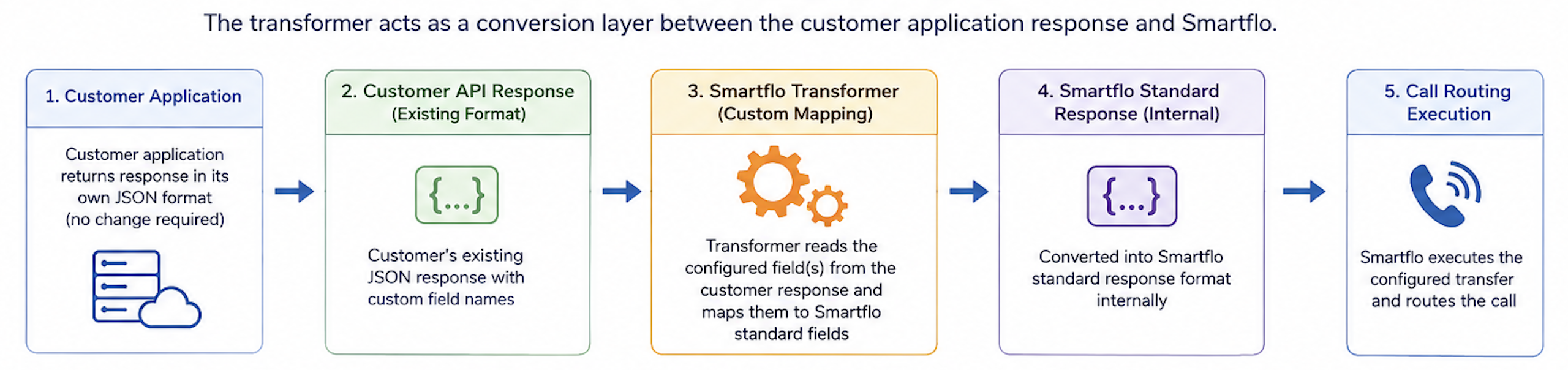
The customer continues returning the same JSON that their application already exposes. The transformer identifies which fields contain the destination information and converts them internally.
Configuring Custom Mapping
During API Dialplan configuration, enable Custom Mapping and specify the field name that contains the routing destination.
Example configuration:
[
  {
    "transfer": {
      "type": "agent",
      "data": [
        "mx_Custom_1"
      ],
      "ring_type": "order_by",
      "skip_active": true
    }
  }
]
Here:
typedefines the transfer destination.datacontains the field name from the customer's response.- Smartflo automatically replaces this field name with the actual value received in the API response.
Example 1 – LSQ CRM
Many LSQ CRM implementations store the Smartflo Agent Extension inside a custom field instead of returning it using the Smartflo response schema. For example, the agent extension may be stored inside the field mx_Custom_1.

Since modifying the CRM response is not always feasible, Smartflo can directly read this field using Custom Mapping.
Customer API Response
{
  "AssociatedPhoneNumbers": "+9198XXX4372",
  "EmailAddress": "[email protected]",
  "Role": "Sales_User",
  "CompanyName": "AcaXXXXX limited",
  "TelephonyAgentId": null,
  "mx_Custom_1": "0606XXX30022",
  "mx_Custom_9": null
}
API Dialplan Configuration
[
  {
    "transfer": {
      "type": "agent",
      "data": [
        "mx_Custom_1"
      ]
    }
  }
]
Smartflo Conversion
Internally Smartflo converts the response into:
[
  {
    "transfer": {
      "type": "agent",
      "data": [
        "060XXXX0022"
      ]
    }
  }
]
The call is then transferred directly to the configured Smartflo Agent Extension.
Example 2 – Merrito / NPF
Some applications, such as Merrito or NPF, return the destination as an agent mobile number instead of an Agent ID or Extension. In this example, the routing number is available inside the field agent_number.

Smartflo extracts this value and performs the transfer without requiring any changes to the customer's application.
Customer API Response
{
  "status": 1,
  "data": [
    {
      "agent_number": "88XXXX888"
    }
  ]
}
API Dialplan Configuration
[
  {
    "transfer": {
      "type": "number",
      "data": [
        "agent_number"
      ]
    }
  }
]
Smartflo Conversion
Internally Smartflo converts the response into:
[
  {
    "transfer": {
      "type": "number",
      "data": [
        "888XXXX88"
      ]
    }
  }
]
The call is then transferred to the configured mobile number.
Updated 3 months ago