
Nested API Dialplans
Nested API Dialplan enables you to chain multiple API Dialplans together, allowing Smartflo to execute complex, multi-step call flows. Instead of making all routing decisions in a single API call, the call can be passed from one API Dialplan to another, with each dialplan performing a specific action or collecting additional information before determining the next step.
This capability is particularly useful for scenarios where the call flow requires multiple stages of interaction, such as collecting DTMF inputs, validating customer information, or progressively routing the call based on previous responses.
For example, you can:
- Play a welcome message and collect customer input.
- Validate the customer's input using an external application.
- Execute another API Dialplan to perform additional processing.
- Finally, transfer the call to the appropriate destination.
Note: A maximum of three (3) API Dialplans can be nested within a single call flow.
API Dialplan Response Object
To invoke another API Dialplan, your application should return the api_dialplan object in the response.
Response Parameters
| Field | Description | Data Type | Mandatory |
|---|---|---|---|
api_dialplan | Represents the API Dialplan object used to invoke another API Dialplan. | Object | Yes |
data | The unique ID of the API Dialplan to be executed next. | String | Yes |
Note: The API Dialplan ID can be obtained from the Smartflo Portal.
Sample Response
The following example instructs Smartflo to execute another API Dialplan.
[
  {
    "api_dialplan": {
      "data": "6140ffXXXXXXXXX3ac81"
    }
  }
]
Once this response is received, Smartflo invokes the specified API Dialplan and continues the call flow.
Use Case: Customer ID Verification and Intelligent Call Routing
This example demonstrates how Nested API Dialplans can be used to build a multi-step customer verification flow before routing the call to the appropriate destination.
In this scenario, when a customer calls the Smartflo DID, the system first requests the customer to enter their Customer ID.
The entered Customer ID is then sent to the customer's application for validation. Based on the validation result, the customer's application determines the appropriate routing destination and instructs Smartflo to transfer the call.
This approach enables businesses to perform customer verification, account lookup, or any other business validation before routing the call.
Call Flow
- Customer calls the Smartflo DID.
- API Dialplan 1 plays a pre-recorded message asking the caller to enter their Customer ID.
- Smartflo captures the Customer ID as DTMF based on the configured timeout, maximum input length, and retry count.
- API Dialplan 2 sends the captured Customer ID (
last_dtmf) to the customer's HTTPS endpoint for validation. - The customer's application validates the Customer ID by querying its CRM, database, or backend system.
- Based on the validation result, API Dialplan 3 returns the appropriate transfer response.
- Smartflo transfers the call to the destination specified in the response, such as an Agent, Department, Queue, Voice Bot, or IVR.
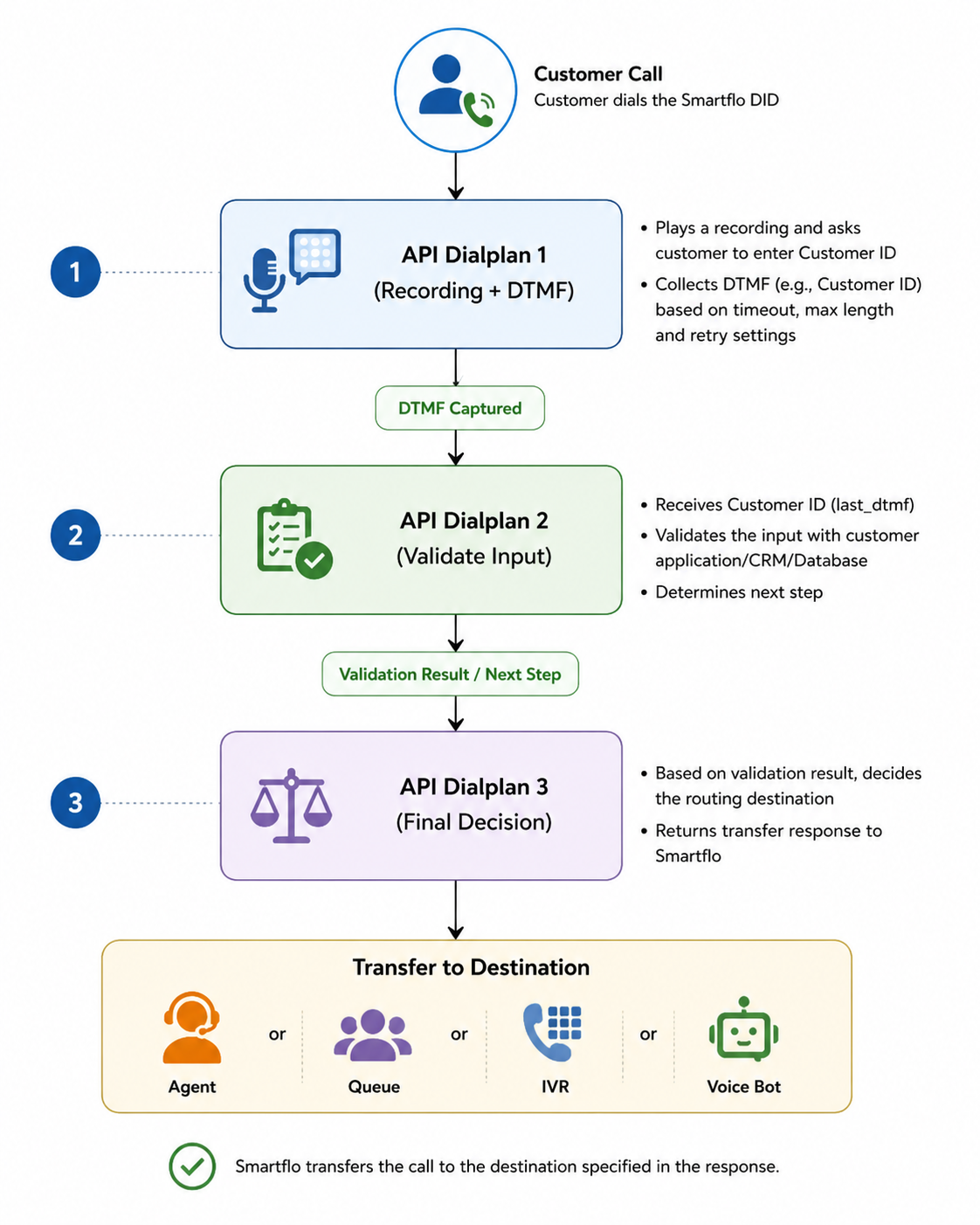
Example: If the Customer ID belongs to a Premium customer, the application may transfer the call to the Priority Support queue. If it belongs to a standard customer, the application may transfer the call to the General Support queue.
Step 1 – Collect Customer ID
The first API Dialplan is responsible for collecting the Customer ID from the caller. When the customer calls the Smartflo DID, Smartflo invokes the first API Dialplan.
Request
{
  "uuid": "$uuid",
  "call_id": "$call_id",
  "call_to_number": "$call_to_number",
  "caller_id_number": "$caller_id_number",
  "start_stamp": "$start_stamp"
}
Expected Response
[
  {
    "recording": {
      "type": "system",
      "data": 15XX48,
      "dtmf": {
        "timeout": 600,
        "maxLength": 4,
        "retry": 2
      }
    }
  },
  {
    "api_dialplan": {
      "data": "673307XXXXXXXX4f06bc14"
    }
  }
]
Explanation
-
Smartflo plays a pre-recorded message such as:
"Welcome to ABC Bank. Please enter your 4-digit Customer ID followed by the # key."
-
Smartflo waits up to 600 milliseconds for the customer to begin entering the Customer ID.
-
The system captures a maximum of 4 digits.
-
If no valid input is received, Smartflo retries the prompt up to 2 times.
-
Once the Customer ID is collected, Smartflo invokes the second API Dialplan.
Step 2 – Validate Customer ID
The second API Dialplan receives the Customer ID entered by the caller through the last_dtmf variable and forwards it to the customer's application for validation.
Request
{
  "uuid": "$uuid",
  "call_id": "$call_id",
  "call_to_number": "$call_to_number",
  "caller_id_number": "$caller_id_number",
  "start_stamp": "$start_stamp",
  "last_dtmf": "$last_dtmf"
}
What happens?
The customer's application can:
- Validate the Customer ID.
- Retrieve customer details from a CRM or database.
- Determine customer priority.
- Identify the appropriate support team.
- Decide the next routing action.
Once the validation is complete, the application returns the next API Dialplan to continue the flow.
Expected Response
[
  {
    "api_dialplan": {
      "data": "6733XXXX64106bc15"
    }
  }
]
Step 3 – Route the Call
The third API Dialplan performs the final routing based on the validation result received from the customer's application.
Request
{
  "uuid": "$uuid",
  "call_id": "$call_id",
  "call_to_number": "$call_to_number",
  "caller_id_number": "$caller_id_number",
  "start_stamp": "$start_stamp",
  "last_dtmf": "$last_dtmf"
}
What happens?
Using the Customer ID received in the previous step, the customer's application determines the appropriate destination and returns the routing response.
For example:
- Premium Customer → Priority Support Queue
- Gold Customer → Dedicated Relationship Manager
- Existing Customer → Assigned Agent
- New Customer → Sales Department
Expected Response
[
  {
    "transfer": {
      "type": "agent",
      "data": ["0500XXXXX01"]
    }
  }
]
Smartflo validates the response and transfers the call to the specified destination.
Updated 3 months ago