
API Tokens
Overview
An API Token is a secure authentication credential used to authenticate applications and integrations when making API requests to Smartflo. APIs require authentication to ensure that only authorized applications and users can access account information or perform supported operations. An API Token provides a secure mechanism for authenticating these requests without requiring the application to send the user's Smartflo login credentials with every API request.
API Tokens are commonly used when integrating Smartflo with external applications such as:
- CRM systems
- Contact center applications
- Customer portals
- Reporting and analytics platforms
- Lead management systems
- Business applications
- Custom applications
- Backend services and middleware platforms
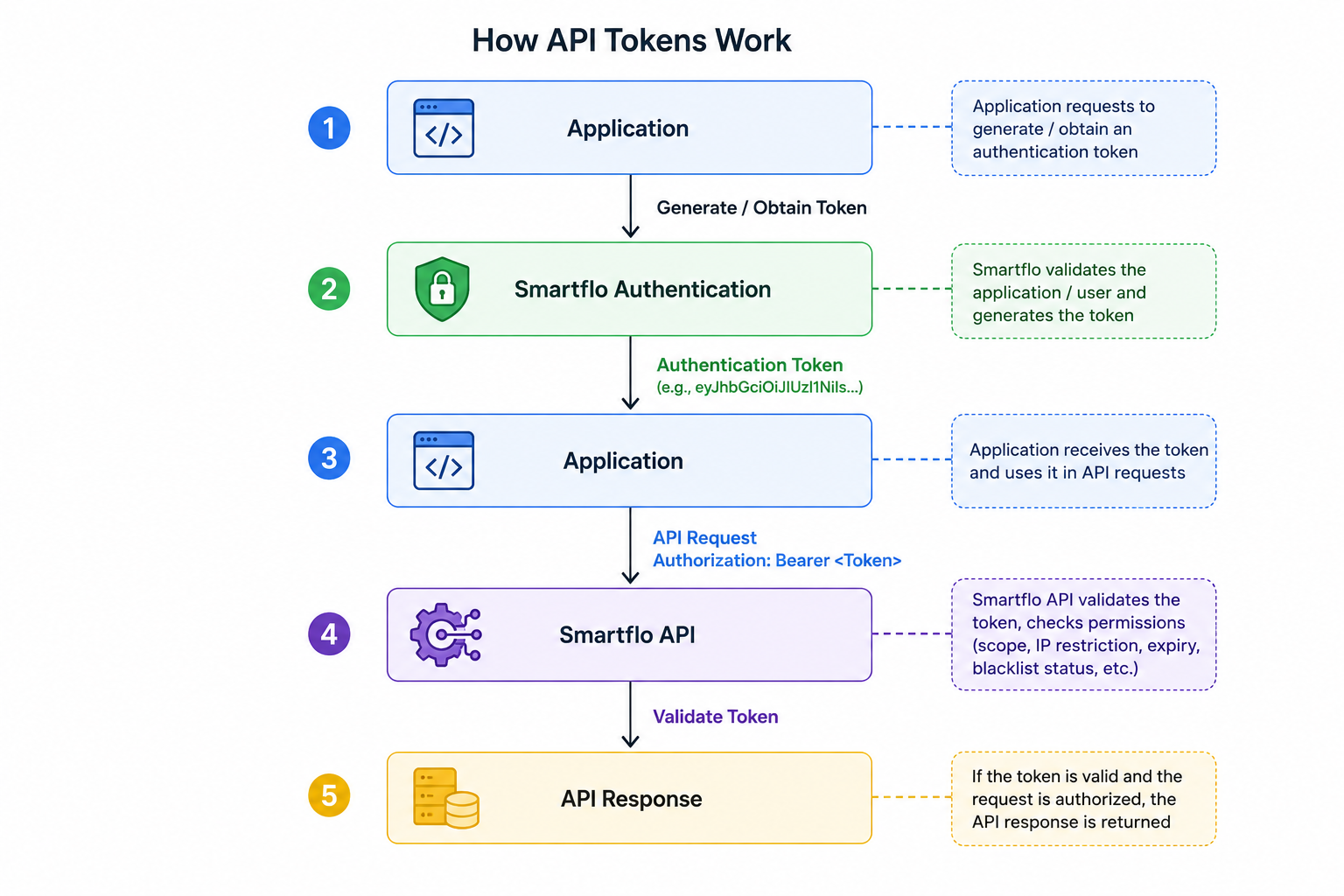
Once an application has a valid authentication token, it can include the token in the API request using the Authorization header.
Authentication Header
Authorization: Bearer <API_TOKEN>Smartflo validates the token before processing the API request. Depending on how the token was generated and configured, additional controls such as token expiry, IP restriction, and API scope restriction may also be applied.
Important Migration NoticeAPI Tokens generated after 9 August 2026 use the configurable expiry selected during token creation.
API Tokens created before 9 August 2026 previously had lifetime validity. As part of the expiry enhancement, the expiry of these existing tokens has been updated to: 31 October 2026, 11:59:59 PM. These existing tokens will not work after the updated expiry date.
If your application is currently using an API Token created before 9 August 2026, generate a new API Token before 31 October 2026 and update your application with the new token.
Once a token expires, it remains visible in the API Token dashboard for 14 days from its expiry date. After 14 days, the expired token is automatically removed from the dashboard and will no longer be available in the UI.
How it Works
The application first obtains an authentication token through one of the supported token-generation methods. The token is then included in subsequent API requests. Smartflo validates the token before allowing the request to proceed.
Depending on the token type, Smartflo may validate:
- Token validity
- Token expiry
- Token status
- IP restrictions
- API scope permissions
Supported Authentication Token Generation Methods
Smartflo supports two methods of generating authentication tokens:
1. Generate an API Token from the Smartflo Portal
Tokens generated from the Smartflo portal can be configured with an expiry period based on the application's requirements.
The available expiry options are:
- 1 Day
- 7 Days
- 15 Days
- 30 Days
- 90 Days
Portal-generated tokens can also be configured with additional access controls such as IP Restriction and Scope Restriction.
2. Generate an Authentication Token using API
Applications can also generate an authentication token programmatically using the Generate a Token API.
Generate a Token API Reference
The API uses the Smartflo account credentials to generate an authentication token. The generated token can then be passed in the Authorization header while making subsequent API requests.
Tokens generated through the API have a default validity of 1 hour (3600 seconds). The API response provides the expires_in value indicating the token validity in seconds.
For example:
{
  "success": true,
  "access_token": "eyJ0eXAiOiJKV1XXXXXXXXXXX...",
  "token_type": "bearer",
  "expires_in": 3600
}
Here, expires_in: 3600 indicates that the generated authentication token is valid for 3600 seconds (1 hour).
Note: The configurable expiry options described in this document apply to API Tokens generated through the Smartflo portal. API-generated authentication tokens have a default validity of 1 hour.
Portal-Generated vs API-Generated Tokens
Although both methods provide authentication for Smartflo APIs, they are designed for different integration requirements.
| Feature | Portal-Generated API Token | API-Generated Authentication Token |
|---|---|---|
| Generation Method | Smartflo Portal | Generate a Token API |
| Expiry | Configurable: 1, 7, 15, 30 or 90 days | 1 hour (3600 seconds) |
| IP Restriction | Can be configured for the token | Follows the IP restriction assigned to the user whose credentials are used to generate the token |
| Scope Restriction | Supported | Not supported |
| Dashboard Management | Available in API Token page | Not managed as a portal-generated API Token |
| Recommended For | Long-running integrations requiring configurable expiry and access control | Applications requiring programmatic, short-lived authentication |
Key Benefits
- Secure API Authentication – Authenticate applications and integrations securely without exposing Smartflo user login credentials.
- Configurable Token Expiry – Define the validity period of portal-generated tokens based on the integration requirement.
- IP Restriction – Restrict token usage to authorized IP addresses for an additional layer of security.
- Scope Restriction – Limit portal-generated tokens to only the Smartflo APIs required by an application.
- Centralized Token Management – View and manage portal-generated tokens, including their expiry, access controls, and status, from a single dashboard.
- Application-Specific Tokens – Create separate tokens for different applications or integrations to simplify access management and token revocation.
- Short-Lived API Authentication – Generate authentication tokens programmatically through the Generate a Token API with a default validity of 1 hour.
Updated 2 months ago