
Token Rotation
To help customers manage expiring API Tokens without requiring manual token generation from the Smartflo portal, Smartflo provides a Token Rotation API.
The Token Rotation API allows customers to generate a new API Token using an existing active token, without requiring the customer to log in to the Smartflo portal.
This is particularly useful for customers using short-duration token validity options such as 1, 7, 15, 30, or 90 days, as the token can be rotated programmatically as part of their integration or token lifecycle management process.
Token Rotation Flow
The token rotation process replaces the existing active token with a newly generated token:
Token A → Rotate API → Token B
After successful rotation:
- Token A is marked as Superseded.
- Token B is marked as Active.
- Token B inherits the applicable configuration and security restrictions of Token A.
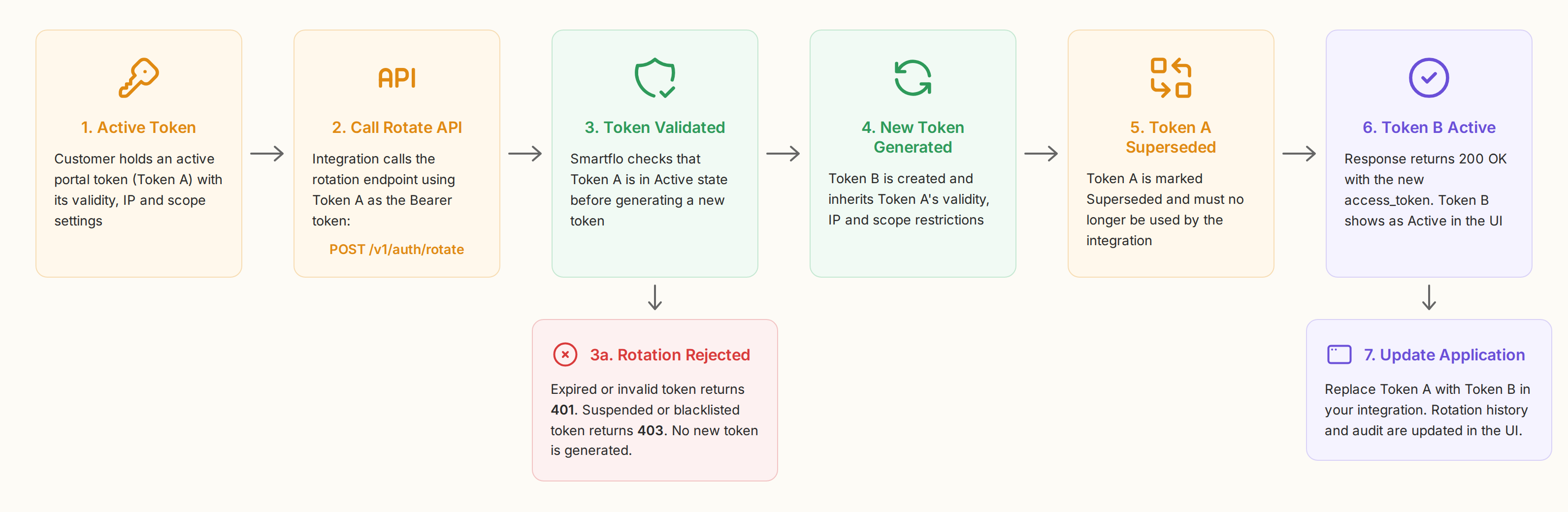
The rotation operation does not bypass or reset the security configuration associated with the original token.
Token Rotation API
Method: POST
Endpoint: https://api-smartflo.tatateleservices.com/v1/auth/rotate
Request Headers
Authorization: Bearer <token>
Content-Type: application/json
The existing active token provided in the Authorization header is used as the source token for rotation.
Successful Response
HTTP Status: 200 OK
{
  "success": true,
  "message": "Token refreshed successfully.",
  "access_token": "eyJ0eXAiOiJXXXXiLCJhbGciOiJIUzI1Ni...",
  "token_type": "bearer",
  "validity_days": 90
}
Response Parameters
| Parameter | Description |
|---|---|
success | Indicates whether the token rotation was successful. |
access_token | The newly generated API Token. |
token_type | Type of authentication token. |
message | Provides the status message for the token rotation operation. |
validity_days | Validity period applicable to the newly generated token. |
Important: The
validity_daysvalue reflects the applicable validity configuration of the newly generated token.
Token Configuration During Rotation
The newly generated token retains the applicable configuration and security restrictions of the source token, including:
- Token validity configuration
- IP restrictions
- Scope restrictions, wherever applicable and supported
- Other applicable token specifications and security configurations
Token rotation does not reset, remove, or bypass security restrictions associated with the source token.
Example
A customer has an active portal token configured with a 90-day validity period and applicable IP restrictions. Instead of logging in to the Smartflo portal when the token needs to be replaced, the customer can call:
POST https://api-smartflo.tatateleservices.com/v1/auth/rotate
Authorization: Bearer <existing_active_token>
Smartflo generates a new token based on the applicable configuration of the existing token.
The resulting lifecycle is:
Existing Token → Rotate API → New Token
The existing token becomes Superseded, while the newly generated token becomes Active. The response returns the new token along with its applicable token category and validity configuration.
Token Validation
Before performing a token rotation, the API validates the source token provided in the Authorization header.
A new token is generated only when the source token is in an Active state. If the source token is expired, suspended, invalid, or blacklisted, the rotation request is rejected and a new token is not generated.
| Scenario | Expected Behaviour | Error Code | Message |
|---|---|---|---|
| Active token | Generate a new token and mark the source token as Superseded. | 200 | Token refreshed successfully. |
| Expired token | Do not generate a new token. | 401 | The provided token has expired and cannot be refreshed. Please generate a new token from the portal. |
| Suspended token | Do not generate a new token. | 403 | The provided token is suspended and cannot be refreshed. |
| Invalid token | Do not generate a new token. | 401 | The provided token is invalid. |
| Blacklisted token | Do not generate a new token. | 403 | The provided token is blacklisted and cannot be refreshed. |
Important: Token rotation can be performed only using an active token. No new token is generated when the source token fails validation.
UI Behaviour
When a token is successfully rotated through the Token Rotation API:
- A new token entry is created in the Smartflo UI.
- The new token is associated with the appropriate token category and applicable configuration.
- The newly generated token is displayed according to the existing token-management behaviour.
- The source token is updated to Superseded.
- The newly generated token is displayed as Active.
- The existing token history and audit information reflect the token rotation event.
The UI should therefore provide visibility into both the source token and the newly generated token, allowing administrators to track the token lifecycle and rotation history.
Suspended Token Expiry
Tokens currently in Suspended status should automatically transition to Expired once their configured expiry date and time is reached.
Token Rotation vs. Token Refresh
The Token Rotation API is introduced specifically for rotating API Tokens generated from the Smartflo portal, while retaining their applicable configuration and security restrictions.
The existing POST /v1/auth/refresh API and its current behaviour remain unchanged.
| API | Purpose |
|---|---|
POST /v1/auth/rotate | Rotates an API Token generated from the Smartflo portal by generating a new token while retaining the applicable configuration and security restrictions of the existing token. |
POST /v1/auth/refresh | Existing token refresh mechanism. Its current behaviour remains unchanged. |
Important: Token Rotation and Token Refresh are separate operations. The introduction of the Token Rotation API does not change the existing behaviour of the Token Refresh API.
Recommended Token Management
Customers using Smartflo API Tokens should incorporate token lifecycle management into their integration. For portal-generated tokens:
- Select an expiry period based on the integration requirement.
- Store the token securely in the customer application.
- Monitor the token's validity and expiry.
- Use the Token Rotation API to generate a replacement token when required.
- Update the application with the newly generated token.
- Ensure the previous token is no longer used after it has been superseded.
Using Token Rotation allows customers to manage token replacement programmatically and reduces the need for manual intervention through the Smartflo portal.
Updated 26 days ago